

PayPal is one of the most popular online payment platforms in the world, allowing users to send money, make purchases, and receive payments securely. If you’re new to PayPal or unsure how to add money to your account, this guide will walk you through all the available methods step by step.
What Does “Adding Money to PayPal” Mean?
Adding money to PayPal means transferring funds into your PayPal balance so you can use them for online shopping, subscriptions, or sending money to others. Depending on your country, PayPal offers several ways to do this.
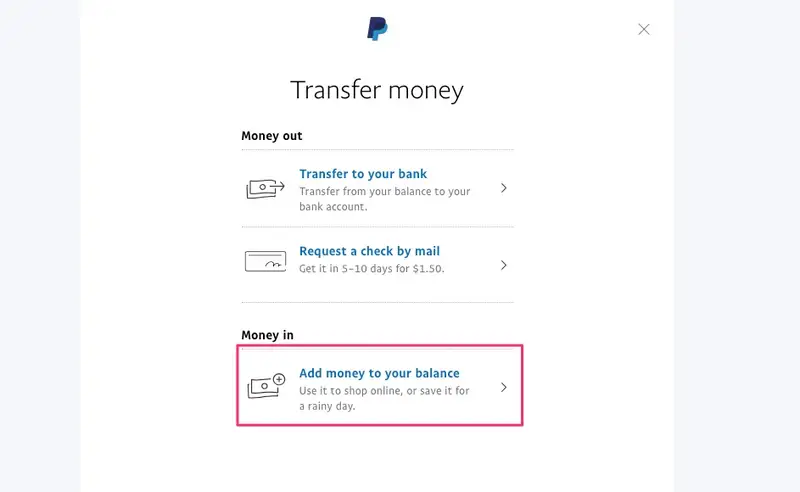
Method 1: Add Money Using a Linked Bank Account
This is the most common and cost-effective method.
Steps:
- Log in to your PayPal account.
- Go to Wallet.
- Select Add money.
- Choose your linked bank account.
- Enter the amount you want to add.
- Click Add or Transfer to confirm.
Important Notes:
- Transfers usually take 1–5 business days.
- This method is typically free.
- Your bank account must be verified first.
Method 2: Add Money Using a Debit Card (If Available)
In some countries, PayPal allows instant top-ups using a debit card.
Steps:
- Log in to PayPal.
- Go to Wallet.
- Click Add money.
- Select your debit card.
- Enter the amount and confirm.
Important Notes:
- Funds may appear instantly.
- Fees may apply depending on your location.
- Credit cards usually cannot be used to add balance directly.
Method 3: Receive Money from Another PayPal User
You can increase your PayPal balance simply by receiving money.
How it works:
- Ask someone to send money to your PayPal email address.
- Once received, the money will appear in your PayPal balance instantly.
This is common for freelancers, online sellers, and personal transfers.
Method 4: Add Money at a Retail Location (Selected Countries)
In some regions, PayPal partners with retail stores to allow cash deposits.
Steps (varies by country):
- Open the PayPal app.
- Select Add cash.
- Generate a barcode.
- Visit a participating store.
- Give cash to the cashier and scan the barcode.
Important Notes:
- Fees usually apply.
- Daily and monthly limits may exist.
Method 5: Automatic Payments from Bank or Card (Alternative)
If you don’t have a PayPal balance, PayPal can still pay directly from your:
- Linked bank account
- Debit or credit card
This means adding money isn’t always necessary, depending on how you use PayPal.
Why Can’t I Add Money to PayPal?
Common reasons include:
- Your bank account or card is not verified
- Your country doesn’t support PayPal balance top-ups
- Account limitations or security reviews
- Reached daily or monthly limits
If this happens, check Resolution Center or contact PayPal support.
Tips for Managing Your PayPal Balance
- Always keep your account verified to avoid limits
- Use bank transfers to avoid fees
- Monitor your balance regularly
- Enable two-factor authentication for security
Conclusion
Adding money to PayPal is simple once your account is set up correctly. Whether you use a bank account, debit card, or receive money from others, PayPal provides flexible options to suit different needs. Choose the method that works best for you and enjoy fast, secure online payments.